Get back a message held in quarantine
Read the quarantine table, pick the right one of three actions, and understand what the spam score does and does not tell you.
Mail scored as spam or malicious is not deleted straight away — it is held in quarantine for you to review and decide: send it to the inbox, or delete it for good.
Before you start
- The domain is live. See Point MX through the filtering gateway
- The sender and subject you are looking for, if you have them
Read the table
Go to Email Security → Quarantine.
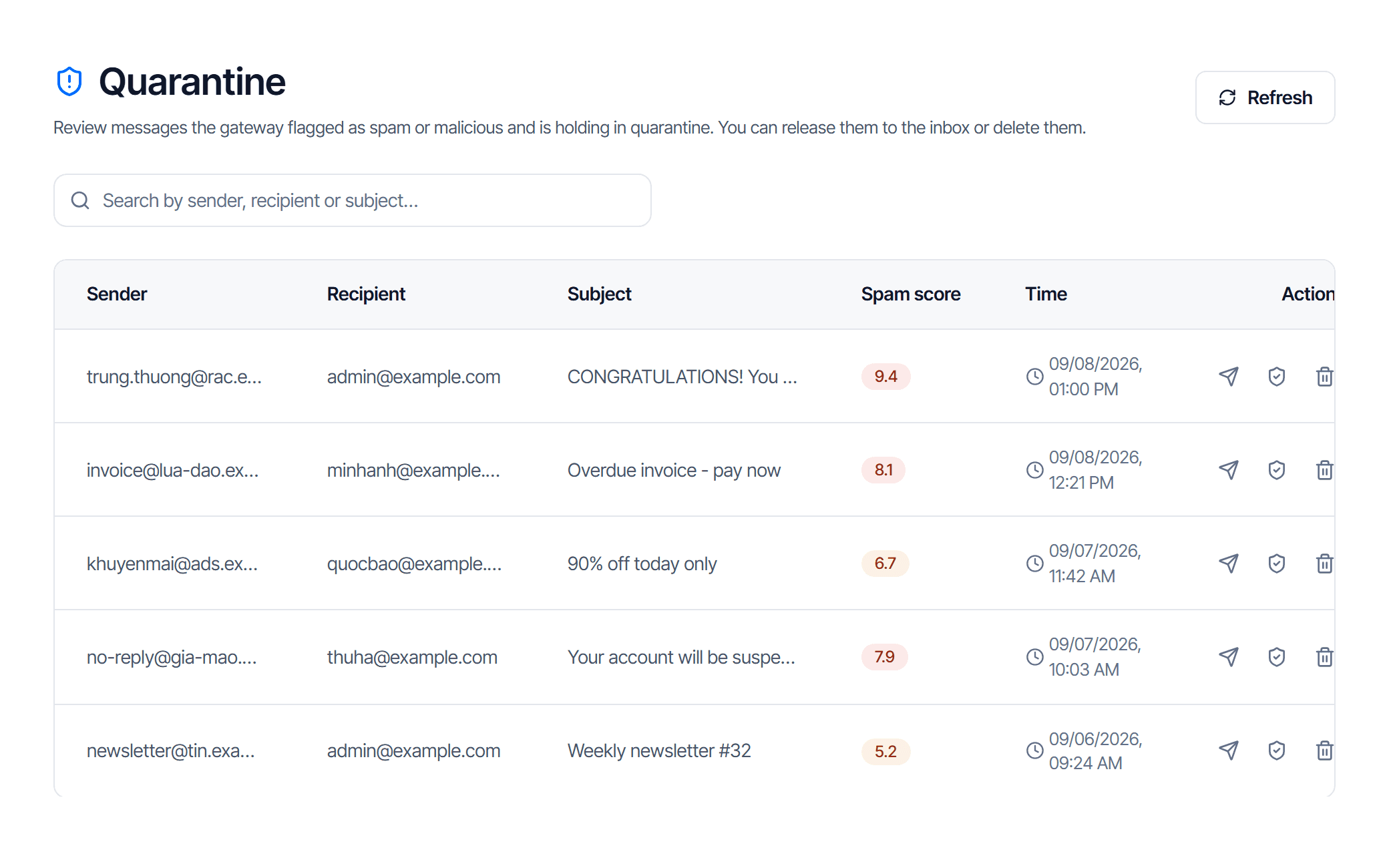
| Column | How to read it |
|---|---|
| Sender | the address the message claims — forgeable, see below |
| Recipient | the mailbox that should have received it |
| Subject | shown as (no subject) when empty |
| Spam score | the higher, the more certain it is junk |
| Time | when the message reached the gateway |
| Actions | three buttons, see below |
The search box filters sender, recipient and subject at once.
What the spam score means
The badge changes colour with the level:
| Score | Colour | What it means in practice |
|---|---|---|
| under 4 | grey | weak signals — common for real mail caught by mistake |
| 4 to under 7 | amber | suspicious; read the sender and subject carefully |
| 7 and above | red | almost certainly junk or a scam |
The score is the machine's confidence, useful for deciding what to look at first — not proof.
Three actions, pick the right one
Hover a button in the Actions column to see its name.
| Button | Name | What it does |
|---|---|---|
| 📨 blue | Release to inbox | delivers this message, this message only |
| 🛡 green | Release and add to the trusted list | delivers it and adds the sender to the trusted list |
| 🗑 grey | Delete | deletes permanently, with a confirmation dialog |
Default to the first button. The second changes your configuration for good: from then on every message from that sender skips spam scoring — the only layer that catches phishing which is just text and a link.
The sender on a spam message is forgeable
The Sender column shows exactly what the message claims, not something that was verified. Clicking release and add to the trusted list on a forged message opens the door for the forger.
Only use the green button when you actively know the real sender and why they were caught. When in doubt use the blue one — it affects a single message.
Deleting is permanent. The confirmation dialog prints the subject and sender — read it before you click.
The page says there is nothing here
"No messages in quarantine" is normal, not an error.
Three reasons the table is empty when you expected messages:
- Nothing has been quarantined. Most junk is rejected outright rather than quarantined — look for the Rejected status in Email tracking.
- The messages aged out. Quarantine does not hold mail forever; old messages drop off.
- The search box still has text in it. Text means filtering — clear it and click reload.
Check your work
After you release a message it reaches the inbox within a few minutes and disappears from the quarantine table. A row still there means the action did not complete — reload before trying again.
If the row is gone but the message never arrives, the problem is the hand-off to your own mail server, not the filter. See Clear a stuck mail queue.