Point MX through the filtering gateway
Point MX at the Email Security filtering gateway so inbound mail is filtered before reaching your server, then verify it really goes through.
Email Security filters inbound mail for the mail server you already run. Your mailboxes stay exactly where they are.
| Path of incoming mail | |
|---|---|
| Before | sender → your mail server |
| After | sender → CloudFly filtering gateway → your mail server |
Before you configure
- Domain ownership verified — that is step 1; this page is step 2, the last one
- Permission to edit DNS records for the domain
- Know the hostname or IP of your current mail server — you need it to cross-check below
Read the Routing configuration page
Go to Email Security → Routing configuration.
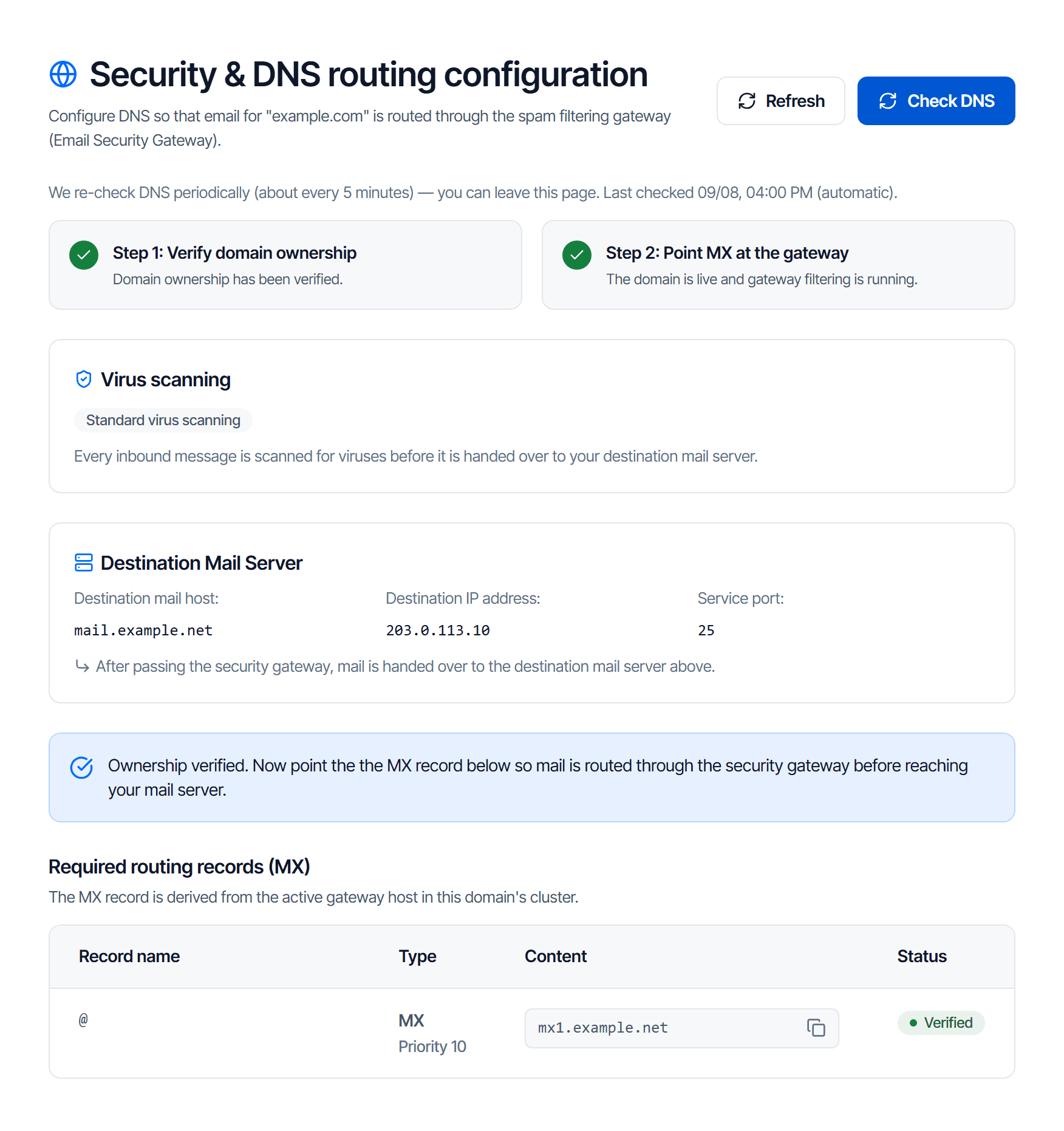
The values in the picture are examples — always copy from your own screen.
Check the destination block before changing anything
The Destination Mail Server block holds three values:
| Field | What it means |
|---|---|
| Destination mail host | Where the gateway hands mail over after filtering |
| Destination IP address | The IP address of that same server |
| Service port | The port used for handover, usually 25 |
This is your mail server, recorded by CloudFly when the service was opened. If it does not match, stop and contact support before changing MX.
Publish the MX records
The Required routing records (MX) table has one or several rows, depending on the gateway servers in your cluster.
| Field | Value |
|---|---|
| Type | MX |
| Record name | @ — meaning the domain itself |
| Content | copy from the CONTENT column |
| Priority | copy the exact number shown next to the type, e.g. Priority 10 |
| TTL | leave at default |
Publish all rows and keep each priority — those numbers decide the failover order.
Delete the old MX records, and do not trust the green tick
The platform's check passes as soon as one MX record points at the gateway. It does not check whether you removed the old MX records.
So: leave the old MX in place and the console still reads The domain is live and gateway filtering is running — while real mail goes straight to your server, unfiltered.
Senders pick the MX record with the lowest priority number. A leftover record with a lower number means all inbound mail bypasses the filter. An equal number splits the traffic. A higher number makes it a fallback path, and mail taking that path is not filtered either.
After publishing the new records, delete every old MX record on the root domain.
Your sending path does not change
Leave your existing SPF, DKIM and DMARC records alone — they describe the mail you send, and that path is unchanged.
The table on the domain page is the complete set; do not copy records from another service's guide.
Wait for the check
Check your work
In the console
Three signs, exactly like the picture at the top of this page:
- The Step 2: Point MX at the gateway card turns green
- The line The domain is live and gateway filtering is running appears
- The STATUS column of the MX row reads Verified
From your own machine
Do not skip this: it checks the one thing the console does not — that the old records are gone.
dig +short MX example.comRead the output as two questions:
- Does every line returned match the CONTENT column in the table?
- Is there any line not in the table?
Question 2 is the important one: one stray line means one mail path that skips the filter, even though the console is green.
Send a test message
From an outside address, send a message to your domain — it should arrive normally. If it does not, re-read the Destination Mail Server block: it is almost always a wrong destination.
Common problems
| Symptom | Cause | Fix |
|---|---|---|
| The page shows "This cluster has no active gateway host yet. Contact support to be issued an MX record." instead of the record table | Your domain is not assigned to a filtering cluster yet, or that cluster has no running server | Nothing you can do yourself — contact support |
| A correct record still reports wrong | Intermediate DNS resolvers still hold the old MX record in cache | Wait out the previous record's TTL and check again; clicking repeatedly does not speed it up |
Troubleshooting
Work from symptom to cause in order, for mail that never arrives, mail that lands in spam, mailboxes you cannot create, and mail apps that will not connect.
Allow / block lists
Use the trusted and blocked lists to override the filter for one address or a whole domain, and learn when not to use them.