Clear a stuck mail queue
Read the stuck queue to see which hop failed, fix the cause on your own mail server, then force a retry instead of waiting.
Mail that cleared the filter but could not reach your mail server is not lost — it waits in a queue and is retried on a schedule. This page shows the queue and lets you force a retry.
Before you start
- The domain is live. See Point MX through the filtering gateway
- Access to your own mail server's status — the cause is almost always there
A stuck message tells you which hop failed
Incoming mail takes two hops:
sender → CloudFly filtering gateway → your mail server
                                    ↑
                          stuck mail sits right here
A message in the queue means it already passed the filter. So a non-empty queue is nearly always a sign that your mail server has a problem, not the filtering service.
Read the table
Go to Email Security → Stuck mail queue.
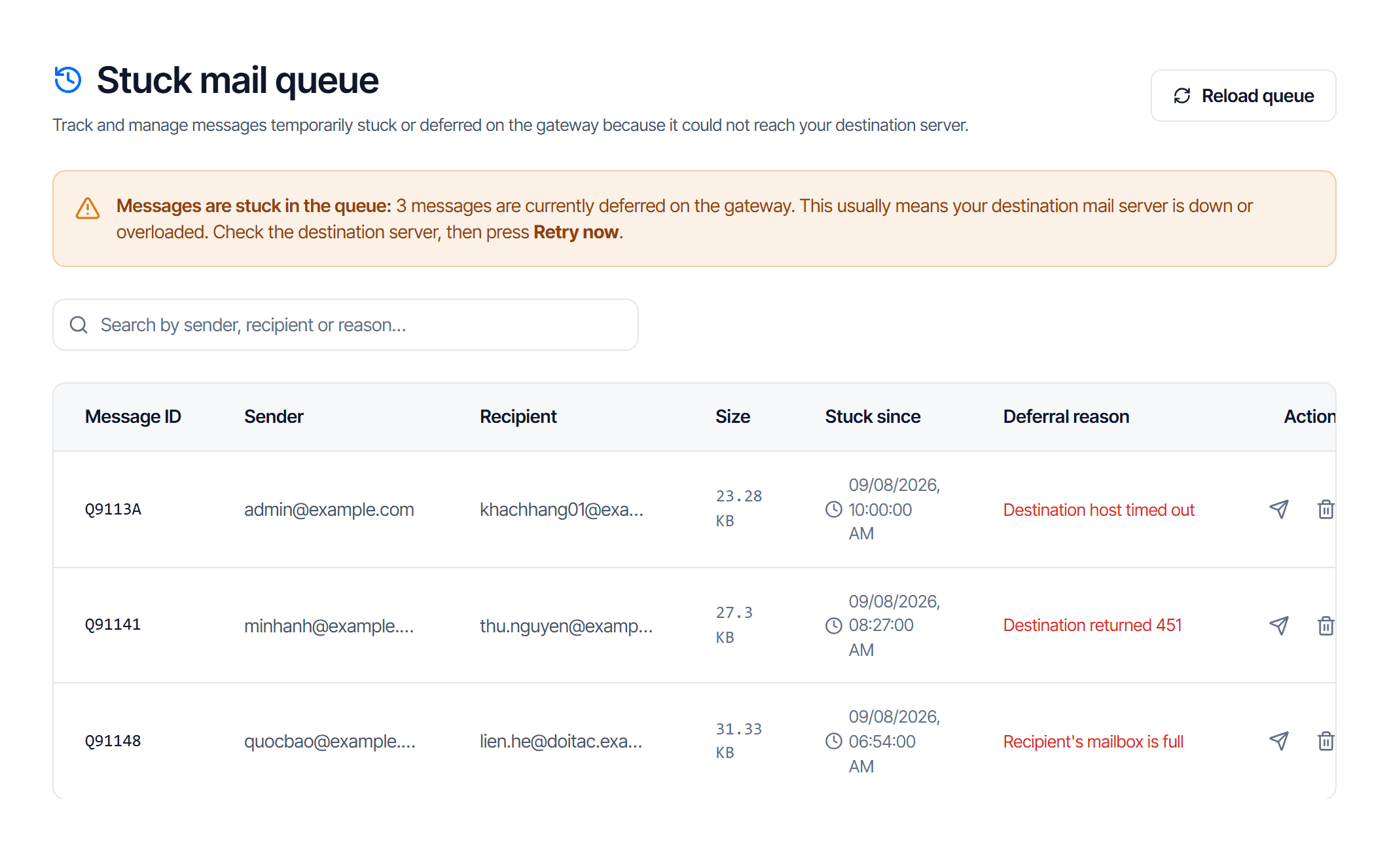
| Column | How to read it |
|---|---|
| Message ID | the message's id in the queue — quote it when contacting support |
| Sender / Recipient | who sent it, and which mailbox is waiting |
| Size | a very large message can itself be the reason for rejection |
| Stuck since | the longer it has been stuck, the less likely it clears on its own |
| Defer reason | what your server answered — read this column first |
| Actions | two buttons, see below |
The Defer reason column copies your destination server's answer verbatim, so it names the problem directly:
| Common reason | What it means |
|---|---|
| connection timed out | your server is not answering — down, or blocked at a firewall |
| temporary rejection | your server is overloaded or rate-limiting |
| no such mailbox | the recipient address does not exist on your side |
| over quota | the recipient's mailbox is full |
Two actions
| Button | Name | What it does |
|---|---|---|
| 🔄 | Retry now | skips the automatic schedule and attempts delivery immediately |
| 🗑 | Delete message | drops it from the queue — it will never be delivered |
Fix the cause first, then retry. Clicking retry while the server is still broken only produces another failure; the system keeps retrying on its own, so waiting costs nothing.
Deleting loses a real message, and the sender is not notified
It cannot be undone. Only delete when you are sure the message is not needed — junk that slipped through, or mail to an address you have retired.
How to work through an incident
Do not start by clicking retry.
- Read the Defer reason on a few rows. The same reason everywhere means one shared incident; different reasons mean several separate problems.
- Check your mail server is running and accepting connections from outside.
- Compare the destination routing block on the routing configuration page — the host, IP and port there must match the server you actually use. One wrong value stalls every message.
- Only then click Retry now, one row at a time.
- Reload the queue to confirm the row has left it.
The page says the queue is empty
"No messages are stuck in the queue" is the good state: everything that cleared the filter has been handed over.
An empty queue while users still report missing mail means the message was rejected or quarantined before this hop — look it up in Email tracking.
Check your work
A row leaving the queue after Retry now means the message was handed over. Ask the recipient to confirm.
If the row stays and Stuck since keeps climbing, the cause is not fixed. Read the reason column again — it has usually changed, and the new one is what you need to act on.