Trace a message that never arrived
Use the Email tracking screen to find where a message stopped, read the Processing outcome column, and open the detail page when you need more.
"A customer says they sent it and I never got it" is the most common question there is. The Email tracking screen tells you where the message stopped — or whether it ever arrived.
Before you start
- The domain is live. See Point MX through the filtering gateway
- The sender or recipient address of the message you are looking for
- Roughly when it was sent
Find the message
Go to Email Security → Email tracking.
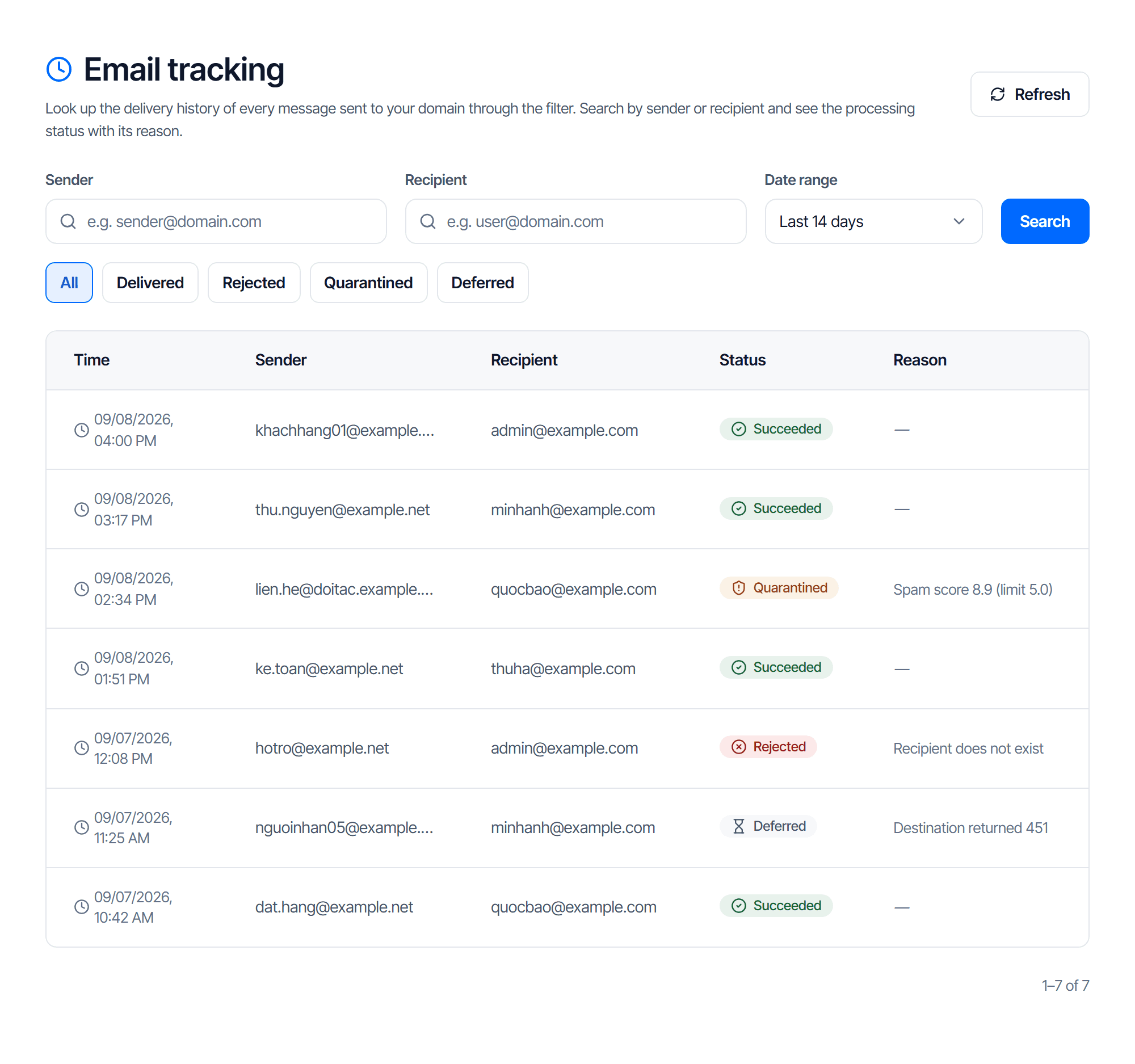
Narrow it with three filters
| Field | What to enter |
|---|---|
| Sender | the sender address, for example sender@example.com |
| Recipient | a mailbox on your domain |
| Date range | last 7, 14, 30 or 90 days |
Click Search. The default range is 14 days — anything older will not show up, and that is the number one reason a lookup "finds nothing".
Then filter by status
The All · Delivered · Rejected · Quarantined · Deferred buttons filter what has already been loaded.
Read the status
| Status | What it means | Where to go |
|---|---|---|
| Delivered | the message cleared the filter and was handed to your mail server | the problem is on your side — check the mailbox, its junk folder, and any forwarding rules |
| Rejected | the filter refused it, or your server did | see Read the Processing outcome column below |
| Quarantined | it is being held and can be retrieved | Quarantine |
| Deferred | not handed over yet, waiting to retry | Stuck mail queue |
No rows at all is a result too: the message never reached the gateway — the MX record is wrong, or the sender typed a different domain. See Point MX through the filtering gateway.
Read the Processing outcome column
The Processing outcome column prints a full sentence — no more short codes to decode.
| What it shows | What it means | Where to go |
|---|---|---|
| Accepted by your mail server | The message passed the filter and your mail server confirmed receipt | The problem is on your side — check the mailbox, its junk folder, any forwarding rules |
| Temporarily deferred by your mail server, will retry | Your mail server replied with a temporary error (4xx code) | The system retries automatically; check the Stuck mail queue if this persists |
| Rejected by your mail server | The filter let it through but your mail server permanently rejected it (5xx code) | Open the detail page to read the response, fix your receiving server's configuration, then ask the sender to resend it |
| Passed the filter, delivery result pending | The filter let it through but hasn't recorded a result from your mail server yet | Reopen the detail page after a few minutes |
| Blocked by the filter | The message matched a block rule and never reached the mailbox | If it is legitimate, check the Filter lists and ask the sender to resend it |
| Sent to quarantine | Flagged as spam and held in quarantine | Quarantine to release it or trust the sender |
| Rejected at connection | The filter refused it before receiving the content, for example the sending server is on a public blocklist | The sender already received the error code — it is on their side to fix |
| Greylisted, waiting for the sender to retry | A spam-filtering technique used with unfamiliar senders | A legitimate sending server retries automatically within a few minutes |
| Unknown | The status code is outside the known set | Report it to support with the Lookup ID from the detail page |
Reporting to support? Grab the Lookup ID from the detail page
Open that message's detail page and copy the Lookup ID, along with the time and the recipient address — those three are enough for support to pull up the exact record.
The detail page for one message
Click a row — or just the time cell — to open that message's detail page. A message follows one of two paths: Received → Filtering → Delivered to your mail server, or Received → Rejected at connection.
| Step | Shows up when | What it includes |
|---|---|---|
| Received | Always | When the message arrived; the sending server (host/IP) if it was captured |
| Filtering | The message wasn't rejected right at connection | The rule that applied; spam score + threshold + signals (if any); virus name (if any); quarantine ID (if it was quarantined) |
| Delivered to your mail server | The filter forwarded the message | The destination server, the result code, and that server's response |
| Rejected at connection | The filter refused it before receiving the content | The rejection code, result code and reason — this replaces the Filtering / Delivered steps |
What 'Details no longer available' means
The filtering system only keeps detailed logs for a short time, depending on configuration. The summary row for that message is still there in the Email tracking list — only the detail page has run out of data to rebuild the journey.
Three common questions
| You hit | How to search | What it means |
|---|---|---|
| "The sender says they sent it and I see nothing" | Sender + 30 days + All | No rows means the message never reached the gateway — check the MX record, and ask the sender whether they typed the domain correctly |
| "Important mail keeps going to junk" | Find the row, read its status | Quarantined means release it in Quarantine. Caught repeatedly means adding that exact address — not the whole domain — to the trusted list |
| "Sometimes it arrives, sometimes it doesn't" | Filter status Deferred | Nearly always your own mail server being intermittent rather than the filter — see Clear a stuck mail queue |
Check your work
Answer these three with data rather than guesswork:
- Did the message reach the gateway? — a row exists, or it does not
- What does the processing outcome say? — read the sentence straight off the Processing outcome column
- Need more? — open that row's detail page
Answer those three and you know whether the fix belongs to CloudFly or to you.
Stuck queue
Read the stuck queue to see which hop failed, fix the cause on your own mail server, then force a retry instead of waiting.
About Email API
Send transactional mail with one HTTP call. This page helps you choose between Email API and Email Relay, and points you to the full parameter reference.