Read and manage the suppression list
Understand why an address is suppressed, which ones you may remove, and when to add an address to the list yourself.
The suppression list holds addresses the system will no longer send to. Mail to them is dropped before leaving the system — you still get an accepted status but nobody receives anything.
Before you start
- You can already send. See Send your first message with Email API
Why the list exists
Read the reason column
Go to Email API → Suppression list.
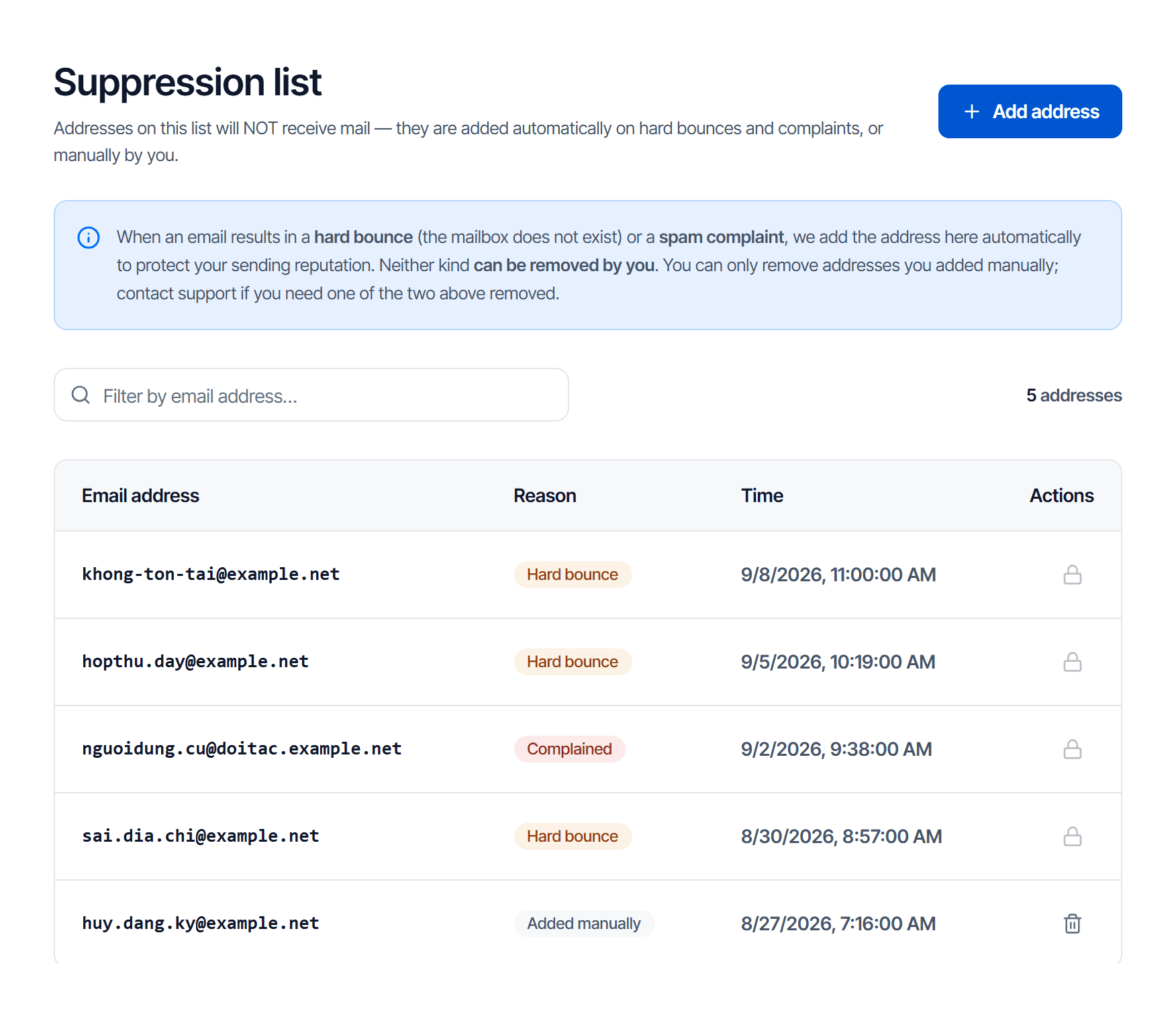
| Reason | Means | Can you remove it |
|---|---|---|
| Hard bounce | the receiver said this address does not exist — a definitive answer, not delayed or temporarily refused mail | no — contact support |
| Spam complaint | the recipient pressed the report-spam button | no — contact support |
| Added manually | you or a colleague added it. Re-adding a locked address does not lower its reason | yes, when the reason no longer applies |
The first two are locked deliberately. Sending reputation is shared across the whole platform: mailing a hard-bounced address again spoils the numbers for every customer, not just you.
When to add manually
Add before the system detects it, in two cases:
- A customer asks to stop receiving mail — add them immediately, do not wait for them to report you as spam
- You know an address has been retired, for example an employee who left
Removing an address
The remove button appears only on Added manually rows; the other two show a lock icon. Remove a manual row once the reason for adding it no longer applies.
To get a locked row removed, ask support and include:
- The address, and the reason shown next to it
- Evidence that it works again: the owner confirms it, or you control the domain and know the mailbox was recreated
Never clear out your manual rows to tidy the list
Addresses you added yourself are usually people who asked to stop receiving mail. Remove them, send again, and you push them straight to the report-spam button — and a complaint is one nobody can undo for you.
With both Email API and Email Relay on, the list can be shared
Suppressed addresses may be synchronised between the two services, and such rows carry a label saying which service they came from. That is deliberate: an address that does not exist does not exist for either sending path.
If you remove one on one side, check the other.
Check your work
After adding an address to the suppression list, send a test message to it:
- The call still returns an accepted status — by design, not a fault
- No message arrives
- Stats & logs shows the message suppressed, not failed in transit
Point 1 is where confusion starts: an accepted status means the request was valid, not that the message went out. To know that, read the logs or listen for a webhook event.
Templates
Create templates with substitution variables and send them by template_id, so you can change message wording without redeploying your application.
Troubleshooting
Go from symptom to cause in order, for calls that are rejected, calls that succeed but never arrive, and rejections for exceeding limits.