Use templates in Email API
Create templates with substitution variables and send them by template_id, so you can change message wording without redeploying your application.
Embedding message HTML in source means redeploying to change a comma. Templates separate the
content from the code: the application only sends a template_id and the data.
Before you start
- You can already send. See Send your first message with Email API
Browse the templates
Go to Email API → Templates.
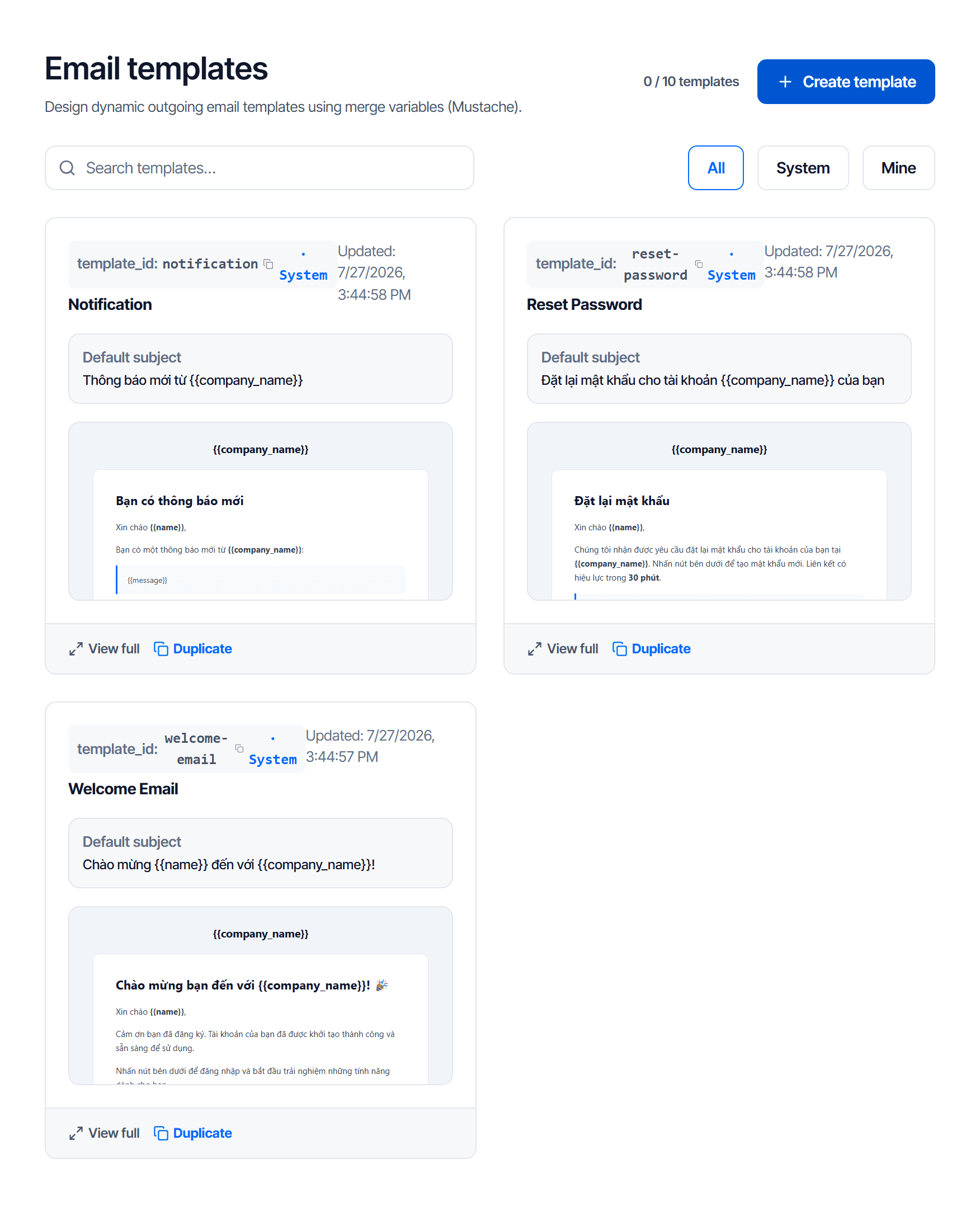
Three filters split templates into two sources:
| Filter | What it is |
|---|---|
| System | CloudFly's built-in templates — usable and duplicable, not directly editable |
| Mine | templates you created — editable and deletable |
The maximum number of templates for your plan is shown at the top as used / limit.
Start from a system template
Do not write from scratch: open the System filter, find the closest template, click Duplicate — the copy becomes yours and is fully editable, and the original stays intact for comparison.
template_id is what your code uses
Each template has a template_id shown at the top of its card, for example welcome-email. That is
the value you pass in the send call, not the display name.
{
  "from": "no-reply@example.com",
  "to": "customer@example.net",
  "template_id": "welcome-email",
  "variables": { "name": "An", "company_name": "Company A" }
}
The full parameter list lives in Email API → Guide in the console.
Changing a template_id breaks a running application
template_id is the contract between the template and your code. Change it and every call using the
old value is rejected immediately, with no grace period.
If you really must change it, create a new template with the new id, update the application, and only then delete the old one.
Substitution variables
Wherever data belongs, put a variable in the template, for example {{name}}. When sending, the
application passes the matching value in variables.
Variables work in the subject as well as the body — the template card shows the default subject with its variables so you can see them at a glance.
Three things that trip people up:
- Missing a variable when sending — that spot renders empty, or leaks the raw variable name into the message the customer receives. Pass every variable the template uses.
- Misspelling a variable name.
{{fullName}}and{{fullname}}are two different variables. - Putting HTML inside a variable. Variables carry data, not layout — change the template if you need a different layout.
Click View full to review the whole template before sending for real.
Check your work
- Send a message using that
template_idto your own mailbox - The call returns an accepted status
- The message arrives and every variable has been substituted — no curly braces left anywhere
- The subject has been substituted too, not just the body
Points 3 and 4 must be checked by eye: forget a variable and no call reports an error — it sends normally, and only the customer sees the blank.
Event webhooks
Configure an endpoint so your code knows whether a message arrived or failed, pick the right events, and verify the signature so you cannot be fed fake data.
Suppression list
Understand why an address is suppressed, which ones you may remove, and when to add an address to the list yourself.